

Overview
Data annotation involves labeling or tagging data to make it comprehensible and usable for Artificial Intelligence and machine learning algorithms.
Skeletal Key Point was one of the features in the Video Annotation (VA) tool which allowed users to label human poses or anatomy of an object which can then be used to train the algorithms.
Problem Statement
One of our clients requested this feature as they received inaccurate data results that were sent to us. Users were unable to annotate accurately with the existing Bounding Box tool, thus the data results were not detailed enough as it had some missing information about human poses.
Goal
Therefore, the main goal of the Skeletal Key Point project was to solve one of our existing client’s issues with their video annotation work. They wanted to use our platform and expertise to import data and annotate human poses with higher quality and accuracy.
It achieved this by providing a visualisation of the functional connections between key points, which was one of the basic annotation tools in data labelling. The connections made annotation errors very noticeable, and therefore less costly to fix. This capability was also supported in the review portal which allowed clients to review the annotated work, and it made the quality review and acceptance easier and less tedious.
Users & Audience
There were 2 personas who used this feature:
- The administrator who configures and enable the tool in the system (Control Portal).
- The worker who used the tool (VA tool) to localize the skeletal key points.
Roles & Responsibilities
I was the designer for this project, working closely with the Product Owners and developers in the US and KL teams. The US team was responsible for the VA tool, while the KL team was responsible for the configurations in the Control Portal.
Scope & Constraints
Limited information and domain knowledge
I have to admit that I am not familiar with most of the technology in the AI industry, and being assigned to this project sounded really daunting.
There were not many pose estimation tools that I could refer to, and I found that most of the annotation tools offered the same method of annotating. They required the annotators to build a template in the configuration system, and this template will be imported into the annotation tool. The annotators will have to move the key points one by one to adjust the template based on the object in the video or image. This makes it very time-consuming and tedious.
Limitations of technology in the existing system
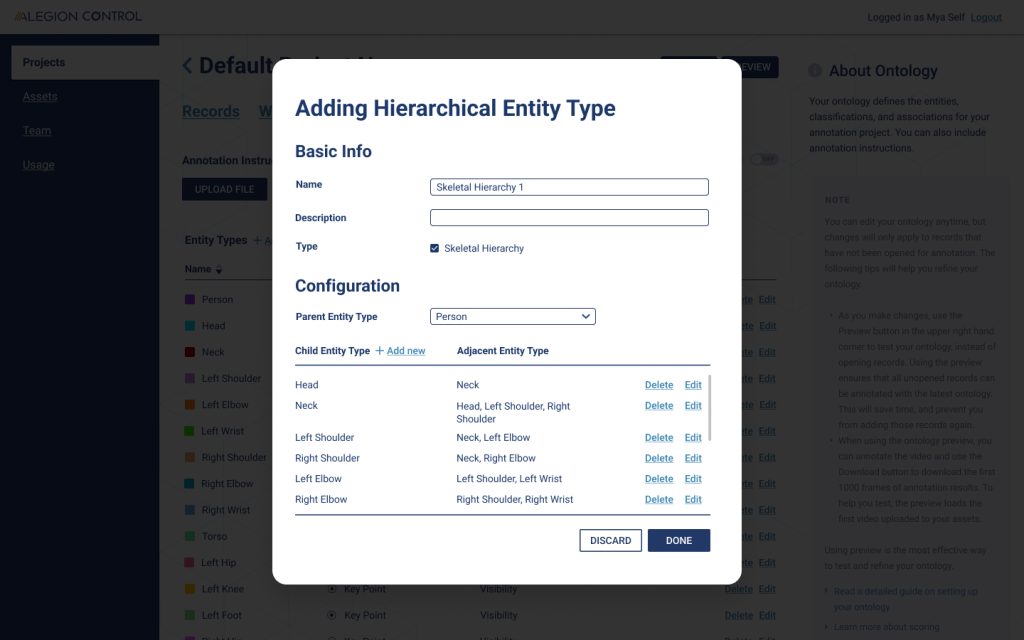
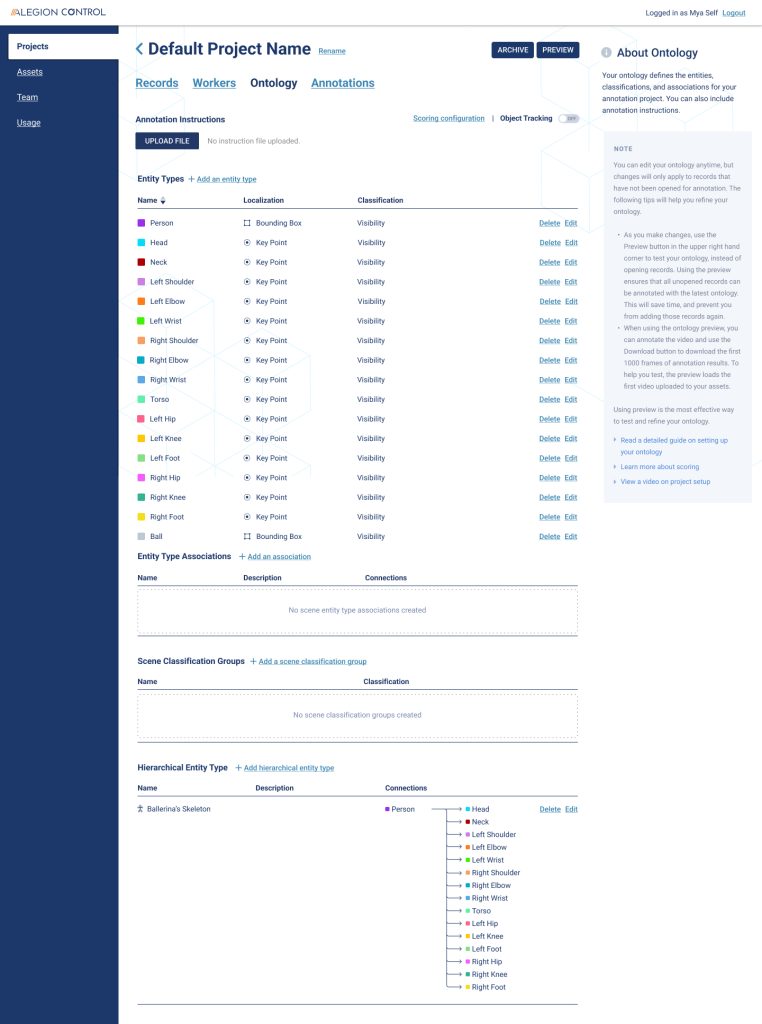
As I was not familiar with the technology, I had to decide whether to follow the existing tools which are available in the market, or to make use of the existing features in our system. Building a new set of features just to support the Skeletal Key Point capability was very costly and we had a tight deadline to meet. I had a discussion with the Lead Developer and Product Owner and we decided to make use of the hierarchy relationship feature in our system to build the Skeletal Key Point.
The Process and Solution
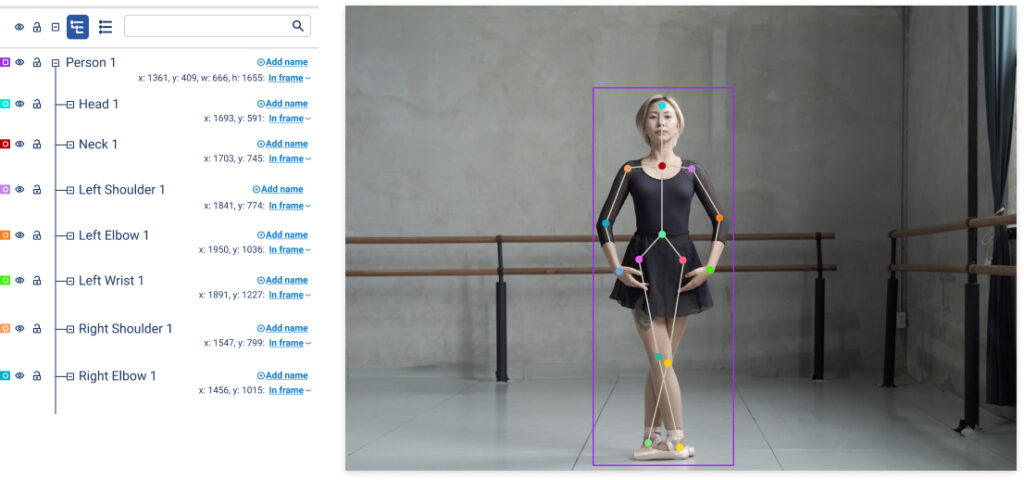
I came up with a user flow based on my research on the existing tools from competitors and also interviewing the annotators who used the VA tool, as I felt that these two methods would be the fastest in getting information about the VA tool.
Based on the flow, there are two personas involved; the Admin who sets up the skeletal key point configuration in the Control platform, and the Worker, who localizes the skeletal key point in the Worker Portal platform.
I’m going to focus more on the worker side, as this involved a lot of interactions on the tool.
Therefore, instead of having the user create a template in the system and importing the template into the annotation tool based on the tools available in the market, we decided to make use of our hierarchical feature in our system. Based on the workflow in the Figma file, this was what I came up with:
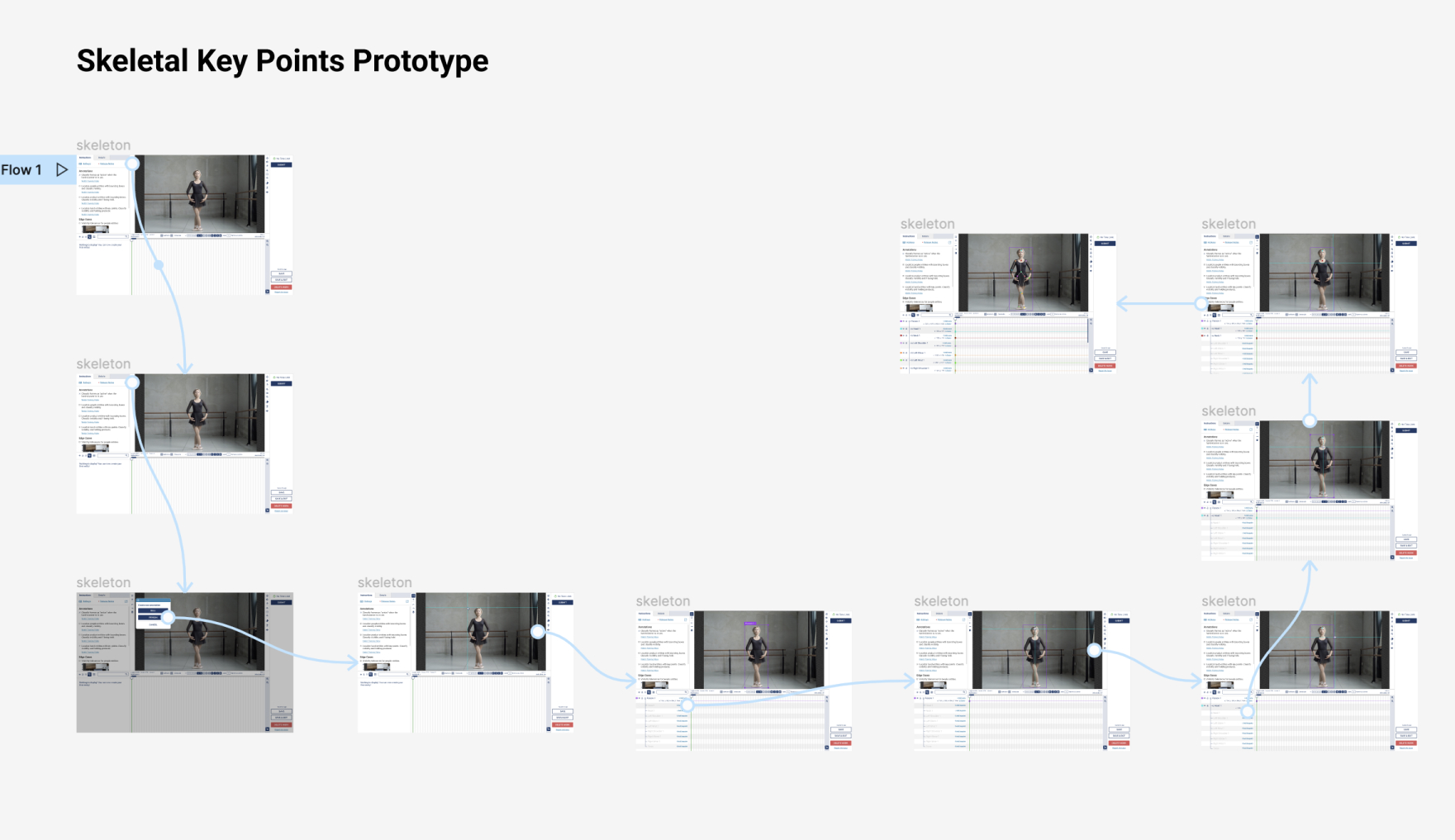
The user can annotate right away in the annotation tool by localizing the key points in the canvas. During the localization process, the key points will be connected automatically with a ‘skeletal line’. Once it is completed, a ‘skeletal frame’ is rendered.
The ‘skeletal line’ is configured in the system by using the existing hierarchical relationship feature.
Conclusion
This feature does not only cater to human pose estimation, as it can be used for other types of annotations as well, ranging from annotating inanimate objects, for example, cars, to the anatomy of an animal.
After the project was launched, the response from the stakeholders was very good. There were plans to improve this feature such as developing the system to be intelligent enough to localize a key point automatically as the annotation moves along the hierarchical list, but for now, I am happy with the result as this was a challenging project to work on. I have learned a lot while working on this project, especially about pose estimation in the AI industry which I was unfamiliar with in the beginning.


